

KPKB-Assist Login India: Complete Registration, Login,& User Guide

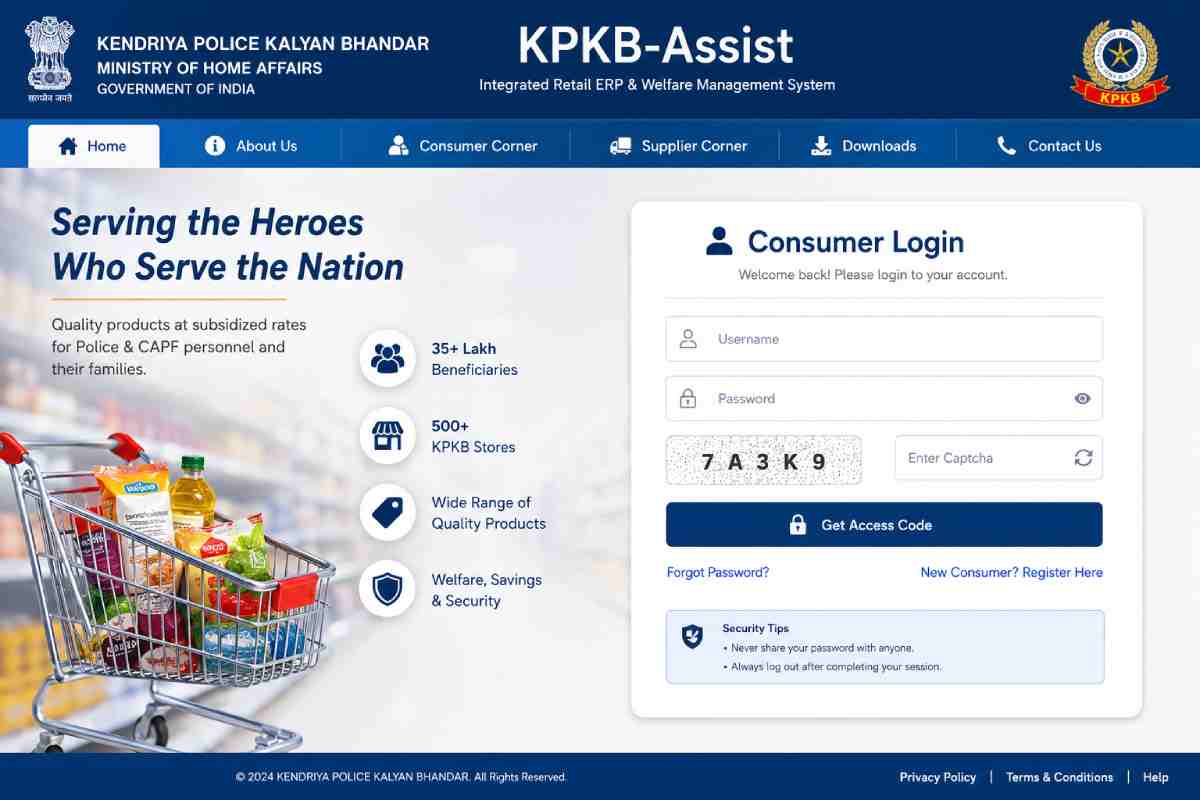
The Indian government has introduced several digital welfare systems for defense and police personnel, and one important platform among them is Kendriya Police Kalyan Bhandar KPKB-Assist. The portal helps eligible police personnel, CAPF staff, retired employees, and their families access subsidized products, canteen services, vehicle purchase schemes, and online account management.
Many users search online for “KPKB-Assist login,” “kpkbmha.in registration,” “KPKB canteen price list,” and “consumer login portal India.” This guide explains everything in simple language, including login steps, registration process, eligibility, benefits, password reset methods, and frequently asked questions.
The official KPKB platform is managed under the Ministry of Home Affairs (MHA), Government of India.
What Is KPKB-Assist?
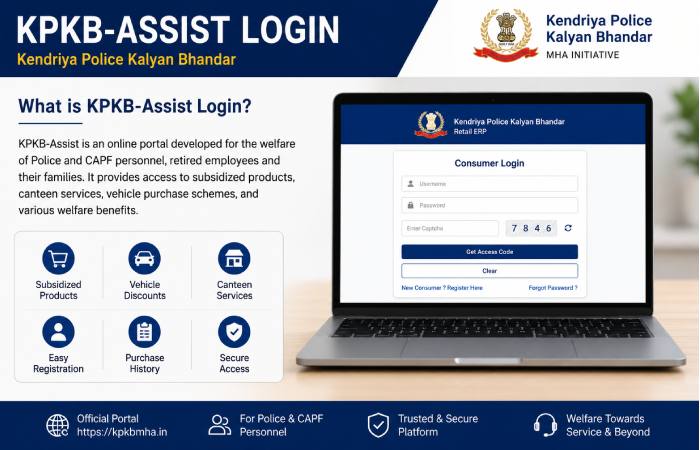
KPKB-Assist is an integrated retail ERP and welfare management portal created for police and paramilitary welfare services in India. The platform supports the operations of Kendriya Police Kalyan Bhandar stores and affiliated canteens.
The portal allows authorized users to:
| KPKB-Assist Features | Purpose |
|---|---|
| Consumer Login | Access canteen services |
| Supplier Login | Supplier and vendor management |
| HQ Login | Headquarters administration |
| Registration System | New consumer enrollment |
| Vehicle Price Lists | Discounted vehicle purchase |
| Purchase History | Track orders and invoices |
| ERP Dashboard | Retail management operations |
| Password Recovery | Account recovery support |
According to the official KPKB portal, the organization serves more than 35 lakh beneficiaries across India through master and subsidiary bhandars.
Official KPKB-Assist Login Portal
Users should always access the portal using official government-associated websites.
| Portal Type | Official Access Link |
|---|---|
| Consumer Login | KPKB Consumer Login |
| Headquarters Login | KPKB HQ Login |
| Main Portal | KPKB Retail ERP Hub |
| Supplier Portal | KPKB Supplier Portal |
Always verify the URL before entering your credentials to avoid phishing websites.
Who Can Use KPKB-Assist in India?
The portal is mainly designed for personnel connected to police and paramilitary organizations.
| Eligible Users | Access Type |
|---|---|
| CAPF Personnel | Consumer Access |
| Central Police Organizations | Welfare Purchases |
| State Police Employees | Discounted Products |
| Retired Police Personnel | Canteen Benefits |
| Dependents & Families | Limited Consumer Access |
| Approved Suppliers | Vendor Access |
| Administrative Staff | ERP Dashboard Access |
The Ministry of Home Affairs established the KPKB system as a welfare initiative for serving and retired personnel.
How to Register on KPKB-Assist
New users must complete registration before accessing the login portal.
| Step | Action |
|---|---|
| Step 1 | Visit the official registration page |
| Step 2 | Enter personal details |
| Step 3 | Upload required documents |
| Step 4 | Verify mobile/email |
| Step 5 | Submit application |
| Step 6 | Wait for approval |
| Step 7 | Receive login credentials |
Official registration page:
Documents Required for KPKB Registration
Before registration, applicants should keep documents ready in digital format.
| Required Document | Purpose |
|---|---|
| PAN Card | Identity verification |
| Service Number | Employee verification |
| Regimental ID | Official validation |
| Passport Photo | Profile creation |
| Aadhaar Details | Dependent verification |
| Mobile Number | OTP authentication |
| Email Address | Communication |
The official portal specifies maximum upload sizes and accepted formats for documents. How to Login to KPKB-Assist
After registration approval, users can access the consumer portal.
Consumer Login Steps
| Login Step | Description |
|---|---|
| 1 | Open the login portal |
| 2 | Enter username |
| 3 | Type password |
| 4 | Fill captcha |
| 5 | Click “Get Access Code” |
| 6 | Complete authentication |
| 7 | Access dashboard |
KPKB Headquarters Login
The HQ portal is designed for administrative and ERP-level operations.
| HQ Functions | Usage |
|---|---|
| Inventory Management | Stock control |
| Consumer Monitoring | User management |
| Invoice Processing | Billing operations |
| POS Integration | Retail transactions |
| Dashboard Analytics | Operational reports |
| Supplier Management | Vendor approvals |
Forgot Password Process
Users who forget their password can reset credentials online.
| Step | Action |
|---|---|
| Step 1 | Open forgot password page |
| Step 2 | Enter username |
| Step 3 | Complete captcha |
| Step 4 | Request OTP |
| Step 5 | Verify OTP |
| Step 6 | Create new password |
Forgot password page:
Major Benefits of KPKB-Assist
The portal provides several welfare advantages for police and CAPF families.
| Benefit | Details |
|---|---|
| Discounted Products | FMCG and daily essentials |
| Vehicle Discounts | Cars and two-wheelers |
| Online Price Checking | Transparent pricing |
| Digital ERP System | Efficient operations |
| Welfare Support | Financial savings |
| Nationwide Reach | Multiple canteens across India |
| Online Access | Easy login and account management |
According to the official KPKB portal, the organization operates hundreds of welfare outlets nationwide.
KPKB Canteen Product Categories
KPKB stores provide various products at subsidized prices.
| Product Category | Examples |
|---|---|
| Grocery Items | Rice, oil, flour |
| Personal Care | Soap, shampoo |
| Electronics | TVs, appliances |
| Vehicles | Cars and bikes |
| Kitchen Essentials | Cookware |
| Home Appliances | Refrigerators |
| Stationery | Office items |
| Lifestyle Products | Household goods |
Several online guides also mention discounted vehicle purchases through the system.
KPKB Vehicle Price List
Vehicle discounts are among the most searched features of KPKB-Assist.
| Vehicle Type | Available Brands |
|---|---|
| Hatchbacks | Maruti Suzuki |
| Sedans | Tata Motors |
| SUVs | Mahindra |
| Scooters | Honda |
| Motorcycles | Hero |
| Commercial Vehicles | Select models |
Vehicle PDFs and pricing updates may be uploaded periodically through official sources.
KPKB Supplier Registration
Suppliers can register to provide products to KPKB stores.
| Requirement | Details |
|---|---|
| PAN Number | Mandatory |
| GSTIN | Required |
| Multi-state Supply | Minimum 5 states |
| Annual Turnover | Eligibility criteria applies |
| Swadeshi Criteria | DPIIT compliance |
Common KPKB Login Problems and Solutions
Many users face technical login issues while accessing the portal.
| Problem | Possible Solution |
|---|---|
| Invalid Password | Reset password |
| Captcha Error | Refresh captcha |
| OTP Not Received | Check mobile network |
| Website Not Opening | Try another browser |
| Account Locked | Contact support |
| Session Timeout | Login again |
| Access Denied | Verify registration approval |
Safety Tips While Using KPKB-Assist
Users should follow cybersecurity best practices while accessing the portal.
| Safety Tip | Importance |
|---|---|
| Use Official URLs | Prevent fraud |
| Avoid Public Wi-Fi | Protect credentials |
| Never Share OTP | Prevent unauthorized access |
| Change Password Regularly | Improve security |
| Logout After Use | Protect account |
| Verify HTTPS | Ensure encrypted connection |
KPKB-Assist Dashboard Features
The ERP dashboard provides multiple management functions.
| Dashboard Module | Purpose |
|---|---|
| POS System | Retail billing |
| Inventory | Stock management |
| Invoice Section | Payment tracking |
| Consumer Data | User management |
| Reports & MIS | Analytics |
| Draft Invoices | Pending billing |
| Settings | Account configuration |
The official SB user guide explains dashboard navigation and operational tools.
Difference Between KPKB and CSD Canteen
Many users compare KPKB with the CSD system.
| Feature | KPKB | CSD |
|---|---|---|
| Managed By | MHA-linked welfare system | Ministry of Defence |
| Main Users | Police & CAPF | Armed Forces |
| Products | Consumer goods & vehicles | Consumer goods & vehicles |
| Online Portal | Yes | Yes |
| Welfare Objective | Police welfare | Defense welfare |
| ERP Integration | Available | Available |
Why KPKB-Assist Is Important in India
The platform supports welfare digitization and provides affordable purchasing options for security personnel and their families.
The system also reduces manual paperwork through centralized ERP technology. Digital management improves inventory tracking, billing, and supplier coordination across India.
Key reasons for its growing importance include:
- Better transparency
- Digital consumer services
- Reduced operational delays
- Simplified canteen access
- Improved welfare delivery
- Online supplier ecosystem
Frequently Asked Questions (FAQs)
Is KPKB-Assist an official portal?
Yes. The platform is associated with the Ministry of Home Affairs welfare ecosystem. (KPKB)
Can retired personnel use KPKB?
Yes, eligible retired personnel may access welfare benefits depending on policy eligibility.
Is registration mandatory?
Yes. Users must register before accessing consumer services.
Can I reset my password online?
Yes. The forgot password feature supports OTP-based recovery.
Does KPKB provide vehicle discounts?
Yes. Eligible users may access discounted vehicle schemes.
Is there a mobile app?
Currently, web portals are the primary access method.
Final Verdict
Kendriya Police Kalyan Bhandar KPKB-Assist is an important welfare-oriented ERP and canteen management platform for police personnel, CAPF members, retired employees, and their families in India. The portal simplifies registration, login, product purchases, supplier management, and welfare services through a centralized digital system.
For eligible users, KPKB-Assist provides significant financial savings through subsidized products, vehicle discounts, and digital convenience. Users should always access the platform through official portals and maintain account security while using online services.