

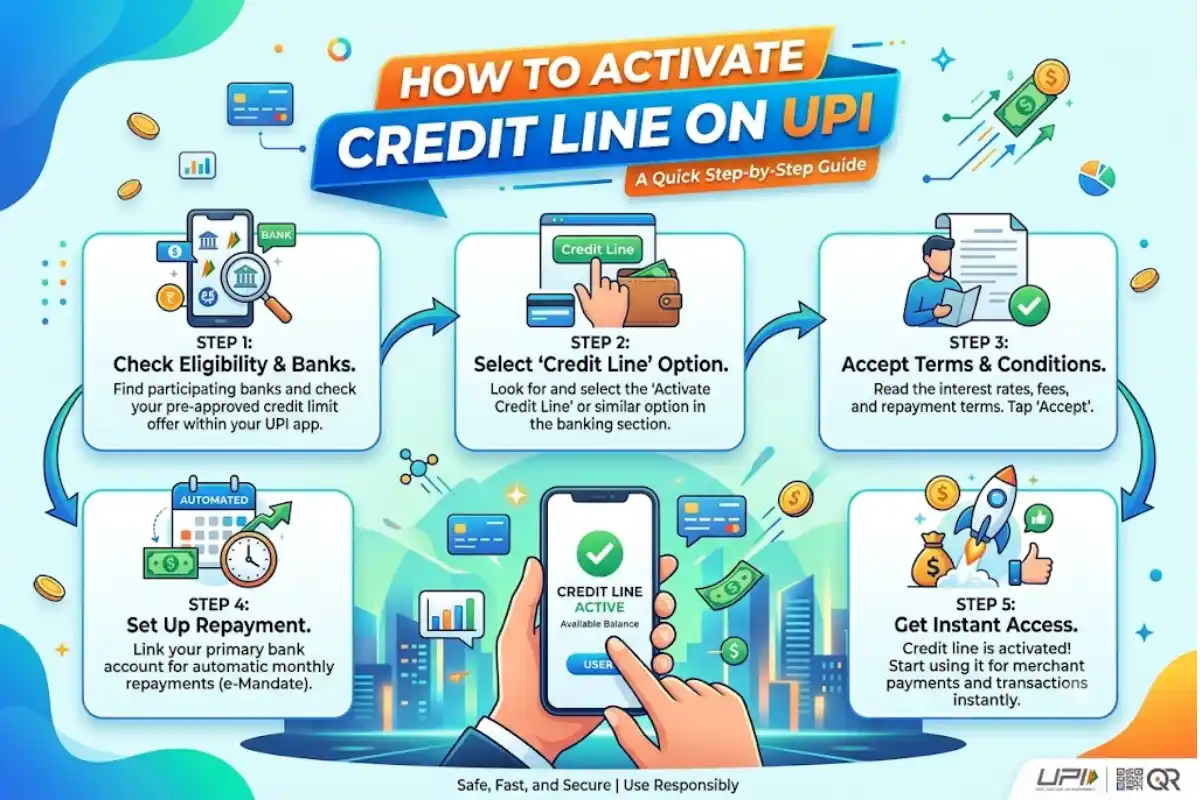
How to Activate Credit Line on UPI: Step-by-Step Guide

A credit line on UPI allows eligible customers to make UPI payments using a pre-sanctioned credit facility provided by a bank. Instead of paying directly from a savings or current account, the transaction can be charged to the linked credit line, subject to the bank’s terms, available limit and applicable charges.
The Reserve Bank of India (RBI) introduced the framework for operating pre-sanctioned credit lines through UPI, while the National Payments Corporation of India (NPCI) provides the UPI infrastructure and onboarding framework.
If your bank and UPI app support this facility, you can generally activate and link the credit line through the app.
This Article Belongs to Credit Debt
What Is a Credit Line on UPI?

A credit line on UPI is a pre-approved borrowing facility that can be used for eligible UPI transactions. It is different from a normal bank account because the money comes from a sanctioned credit facility rather than your deposited balance.
NPCI’s onboarding material shows a UPI flow where users can select Credit on UPI while adding an account.
| Feature | Credit Line on UPI |
|---|---|
| Source of payment | Pre-sanctioned credit line |
| Payment method | UPI |
| Eligibility | Depends on the issuing bank |
| Activation | Through a supported UPI app/bank |
| Repayment | As per the bank’s credit terms |
| Charges | Depend on the bank and product |
How to Activate Credit Line on UPI
The exact screens can vary between banks and UPI applications, but the process generally follows these steps.
1. Check Your Eligibility
Before you activate UPI credit line, confirm that your bank has approved a credit line for you and supports Credit Line on UPI.
Not every credit product or bank account is automatically eligible. NPCI maintains information on participating banks and credit products, and its current list includes several banks enabled for Credit Line on UPI.
2. Open a Supported UPI App
Open your bank’s UPI-enabled mobile application or another supported UPI app.
Make sure the mobile number registered with your bank is available on the device and that your UPI profile is already set up.
3. Go to the Bank Account Section
Look for an option such as Bank Account, Add Bank Account, Manage Bank Accounts, or a similar option.
NPCI’s Credit on UPI brand guidelines illustrate a flow in which the user opens the bank-account section and selects Add Account.
4. Select Credit on UPI
When the supported options appear, choose Credit on UPI or a similarly named option.
This is the key step to set up credit line on UPI. The available option may differ depending on the UPI application and issuing bank.
5. Select Your Credit Line
If an eligible credit facility is available, select it from the list. The app may display information such as the issuing bank, available limit or other account details.
Review the information carefully before proceeding.
6. Complete Authentication
Follow the instructions shown by your bank or UPI app to authenticate the request. You may need to confirm the linkage and provide the required UPI authentication.
Never share your UPI PIN with anyone. NPCI states that the UPI PIN is used to authorise bank transactions and should not be shared.
7. Confirm the Linkage
After successful verification, the credit line should appear as an available payment account or source of funds.
You have now completed the basic process to link credit line to UPI and can select it when making supported payments.
How to Use Credit Line on UPI
Once the facility has been activated, making a payment generally follows the normal UPI process:
- Open your UPI app.
- Scan the merchant’s QR code or enter the UPI ID.
- Enter the payment amount.
- Select the linked credit line as the payment source, if available.
- Review the transaction details.
- Authorise the payment using the required authentication.
The transaction will be processed according to the terms of the credit facility and UPI transaction rules.
Things to Check Before Using a UPI Credit Line
Before you add credit line to UPI, check the following:
- Whether your bank supports Credit Line on UPI.
- Whether your specific credit facility is eligible.
- Available credit limit.
- Interest or other applicable charges.
- Repayment or billing dates.
- Transaction restrictions.
- Merchant or transaction categories where the credit line can be used.
Do not assume that every UPI payment will automatically qualify for credit-line funding. Availability can depend on the bank, UPI app, credit product and transaction type.
What If the Credit Line Option Is Not Showing?
Are there other restrictions? In case you are unable to find the enable credit line on UPI option on your account – your bank or app may not support it, your credit line isn’t eligible, you haven’t completed bank verification, or your bank hasn’t enabled it for you.
Firstly, make sure you have a UPI app and see if your bank supports the service. In case, the line of credit has already been approved, and still, it is not visible, then seek help from the bank that issued the account.
Credit Line on UPI vs Bank Account
A normal UPI bank-account payment uses money available in your linked account. A UPI credit-line payment uses an eligible pre-sanctioned credit facility.
| Point | Bank Account | Credit Line on UPI |
|---|---|---|
| Funding source | Deposited funds | Sanctioned credit |
| Borrowing involved | No | Yes |
| Credit limit | Account balance | Approved credit limit |
| Repayment | Not applicable | According to credit terms |
| UPI use | Yes | Yes, where supported |
Conclusion
Learning how to activate credit line on UPI is relatively straightforward when your bank, credit facility and UPI app support the feature. Typically, you need to open the bank-account section, choose Credit on UPI, select the eligible credit line, complete authentication and confirm the linkage.
Before you use credit line on UPI, however, review the applicable interest, fees, repayment terms and transaction restrictions. Since availability and procedures can differ between banks and apps, always follow the latest instructions provided by your issuing bank.